Claude Code Fundamentals
Learn to install the Claude Code CLI and execute your first file-editing session using the Read/Edit/Write/Bash loop.
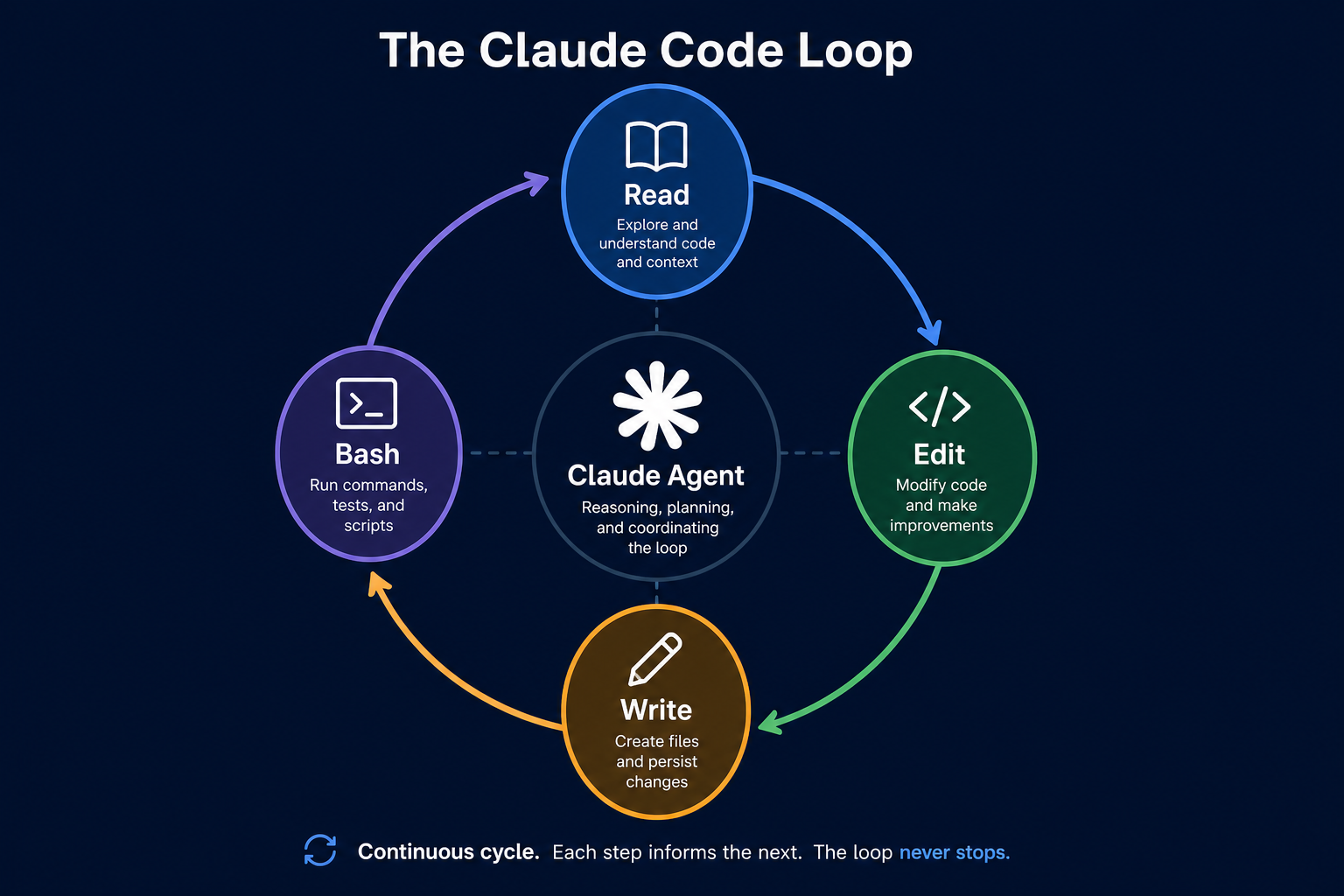
The Agentic Coding Loop
Claude Code operates through a continuous feedback loop known as the Read/Edit/Write/Bash cycle. Unlike a standard LLM chat window, this agent is tethered to your local filesystem and terminal.
The agent reads your project files to build context, edits the code to implement changes, writes those changes to disk, and uses the Bash tool to verify the result. This creates a self-correcting workflow where the agent can run tests and fix its own errors.
For example, if you ask it to fix a broken import, the agent reads the file, edits the import statement, writes the file, and then runs the test command to confirm it works. If the test fails, the agent immediately reads the error output and attempts another edit.
This capability transforms your terminal from a passive execution window into an active workspace. You no longer manually copy-paste code; you guide the agent as it manages the mechanical steps of your development process.
Directing Your First Task
Complete this prompt to give the agent a clear, scoped coding task.
You have a file named 'app.py' that needs a new function to calculate the average of a list, but you want to ensure the agent doesn't change existing imports.
Claude Code does not just generate text; it reads your local filesystem and executes commands to modify your code directly.
The viewer sees the agent reading files and proposing edits in a real terminal. This demonstrates the practical reality of agentic coding versus simple chat.
The First Execution
Observing the agentic loop in a live terminal environment.
Before we begin
Why does the same prompt produce wildly different outputs in an agentic environment compared to a standard chat window? The answer lies in the persistent file-access loop, not the model weights themselves.
What do you predict happens when Claude Code encounters an error while executing a command?
The Cause-Effect Loop
The diagram reveals how the agentic loop removes the manual steps between generating code and verifying it. By closing the gap between editing and executing, the agent acts as an extension of your own development process.
The agent is only as effective as the context you provide. Always define the scope of your task before starting the loop.
Before running risky terminal commands, use checkpoints to ensure you can revert the state if the agent makes an unexpected edit.
Treat terminal output as the primary signal for the agent. If a command fails, the agent will see it and adjust its next edit accordingly.
Confidence check
How confident do you feel in monitoring the agent's actions during the edit-run loop?
Test Your Understanding
If you remember only three things…
Agentic Loops
Claude Code uses a Read/Edit/Write/Bash cycle to automate development tasks directly on your local system.
Human Oversight
Always review diffs before finalizing changes to ensure the agent's work aligns with your project intent.
Terminal as Feedback
The terminal is the agent's primary source of feedback; failing commands help the agent self-correct.
Scoped Directives
Clear, scoped prompts prevent the agent from wandering outside the intended task boundaries.
Term Glossary
4 verified conceptsFrom Manual Coder to Agent Director
You now perceive coding not as an isolated typing task, but as a directed agentic process. Your development workflow has moved from manual execution to active oversight of a file-aware system.
This is where coding stops being a manual pursuit and begins to function as an autonomous, iterative architecture.
In the next lesson, you will learn to use plan mode to review agent intent before changes are applied.
Audio lesson recap
A concise audio summary of this lesson — great for reinforcing key concepts on the go.
Hear it discussed
About three minutes on the ideas in this lesson
Sterling
AI tutor
Vivienne
Sceptical challenger
Press play to start the discussion…
Full transcript · click any line to jump
Ask anything about Claude Code Fundamentals. Sterling will answer — concisely, and with his customary level of patience.